What Is a Hybrid Event and Why It Matters
A hybrid event combines an in-person physical gathering with simultaneous virtual attendance for remote participants. Whether someone is in your Singapore venue or logging in from anywhere globally, they see the same presentations, participate in discussions, and feel included in the event experience.
Hybrid events have become the new standard for corporate conferences, product launches, training sessions, and large public events. They expand your reach beyond geographic limitations and allow participation flexibility. However, producing a successful hybrid event requires careful AV planning—you're essentially producing two events simultaneously: the in-room experience for physical attendees and the streamed experience for virtual participants.
Hybrid AV Architecture: The Basics
A hybrid event setup requires several key technical components working together:
- Cameras: Capturing what in-person attendees see (presentation content, speakers, stage activity)
- Audio System: Microphones capturing speaker content and ambient sound from the venue
- Presentation System: Displaying slides, videos, and other presentation content on venue screens and streaming to remote viewers
- Streaming Platform: Broadcasting live video and audio to remote participants (e.g., Zoom, YouTube Live, custom platform)
- Video Switcher/Director: Managing what camera feed, presentation content, or combination displays on the stream at any moment
- Remote Participant Engagement Tools: Q&A, polling, chat, hand-raise features allowing virtual attendees to participate
- Internet Connectivity: High-bandwidth, low-latency connection to reliably stream live video
Unlike a simple conference that just needs good audio and presentation display, hybrid events require additional cameras, encoding equipment, and streaming bandwidth. This complexity is why professional AV planning is essential.
Camera Placement and Framing Strategy
Primary Camera: Wide Shot of Speakers
Position your main camera to capture the speaker(s) and immediate stage area. This camera shows virtual participants who's speaking and provides context for the presentation. Frame the shot to include the speaker's upper body and allow gesture visibility. Position the camera at or slightly below eye level for flattering perspective.
For a traditional conference stage, the primary camera sits at the back of the room, elevated on a stand or rig, pointed at the speakers. The shot should be framed to include the speaker, podium or presentation area, and enough background context to avoid claustrophobia.
Secondary Camera: Wide Room Shot
A wider second camera captures the entire venue, showing the scale of the physical audience and creating a sense of "being in the room" for virtual attendees. This camera is particularly useful during audience interaction moments (Q&A sessions, panel discussions, networking) to show the full energy of the in-person event.
Use the second camera during moments when the presentation content isn't central to the experience—panel discussions, audience questions, networking moments, award presentations.
Presentation Content Camera (Optional but Recommended)
For some presentations (live product demos, physical prototypes, artistic performances), a close-up camera on the demo object or focal point ensures virtual attendees see details. This is particularly important for product launches, educational demonstrations, or artistic performances that don't rely solely on projected slides.
Mixing Camera Feeds
Use a video switcher/director to manage which camera feed or presentation content shows on the stream at any moment. Typical switching patterns:
- During presentations: Show speaker camera for introduction, switch to presentation slides while speaker discusses content, return to speaker for conclusions
- During panel discussions: Switch between panelists, show full panel for group discussion, show audience for Q&A moments
- During Q&A: Show questioner (if on camera), then speaker responding, then back to presenter
- During breaks: Show venue ambiance, sponsor messages, or beautiful wide shots
Smooth, professional switching creates an engaging stream. Erratic or unclear switching confuses remote viewers and cheapens the production value.
Audio Capture for Hybrid Events
Speaker Audio
Capture all speaker audio through wireless lavalier or handheld microphones fed into your mixing console. This audio goes to both the in-venue PA system and the streaming platform. Proper microphone technique is critical—lazy holding of handheld mics or poor lavalier placement results in thin, inconsistent audio for remote viewers.
Audience Participation Audio
For Q&A sessions, use a roving wireless microphone for audience members asking questions. This ensures remote participants hear audience questions clearly (not just the speaker's response). Position a microphone operator near the questioner to ensure good capture.
Alternatively, use a room-mounted ambient microphone to capture audience reactions and questions, but this risks capturing side conversations and background noise. The roving microphone approach is preferable for clarity.
Environmental Audio
Capture ambient sound from the venue—applause, audience reactions, venue energy—to convey the atmosphere to remote viewers. However, balance this carefully; too much ambient noise becomes unpleasant for remote listeners. Your audio technician should monitor and mix appropriately.
Internet Bandwidth and Connectivity Requirements
Bandwidth Calculation
Streaming video requires significant bandwidth. A typical 1080p video stream at 30 frames per second requires approximately 3–5 megabits per second (Mbps) of upload bandwidth. If you're streaming at higher quality (2K or 4K), double or triple that requirement.
For hybrid events in Singapore, you typically need:
- Minimum: 10 Mbps upload (adequate for 1080p with moderate quality)
- Recommended: 25 Mbps upload (smooth 1080p streaming with headroom for network fluctuation)
- Ideal: 50 Mbps+ upload (supports high-quality 1080p or 4K streaming with substantial redundancy)
Additionally, you need adequate download bandwidth for remote participant interaction and content delivery (roughly 5–10 Mbps), though this is typically less critical than upload bandwidth.
Connection Type and Reliability
Use a dedicated business-class internet connection rather than standard residential internet. Most Singapore venues have office-grade connections, but confirm upload speeds with the venue IT team before your event.
Critical: Test your internet speed and streaming to your platform at least one week before the event. Don't discover bandwidth problems on event day. Many venues can upgrade their connection temporarily for events—request this if needed.
Backup Connectivity
Even professional internet connections can fail. Plan a backup:
- Mobile hotspot: Have a 4G or 5G mobile hotspot from a different carrier as backup (not the same provider as your primary internet). This provides continuity if your primary connection fails, though with potentially reduced quality.
- Dual internet: Use bonded connections from two different ISPs, automatically switching if one fails.
- Failover streaming platform: Have your streaming platform account configured to allow quick switching if your primary setup fails.
Remote participants would rather see a temporary drop to a lower-quality stream than lose connection entirely, so having a backup even if it's lower bandwidth is essential.
Streaming Platform Selection
Popular Hybrid Event Platforms:
- Zoom Webinar: Excellent for interactive engagement, built-in polling and Q&A, easy for participants. Limited customization, not ideal for large audiences (1000+).
- YouTube Live: Supports unlimited concurrent viewers, excellent free option, minimal interactive features. Good for one-way broadcasting.
- Vimeo Live: Professional streaming with good quality, interactive features, customizable appearance. More costly.
- Custom Platforms: Some organizations use branded custom platforms for complete control and branding. Requires more technical setup.
- LinkedIn Live: Good for B2B and professional audiences, integrates with LinkedIn ecosystem.
For Singapore corporate events, Zoom or YouTube Live are most common. Your choice depends on your interactive engagement needs (Zoom for high interaction, YouTube for large one-way broadcasts) and audience familiarity.
Engaging Remote Participants
Interactive Features
Hybrid events must intentionally engage remote participants. Without design for remote engagement, virtual attendees become passive viewers rather than participants. Use:
- Live Q&A: Allow remote viewers to submit questions (via chat or dedicated Q&A feature) which presenters answer
- Polls and Surveys: Interactive polls allow remote viewers to participate in real-time decision-making or feedback
- Live Chat: Moderated chat allows virtual attendees to discuss with each other and occasionally with presenters
- Hand Raise: Remote participants can "raise hand" to ask questions or get called on for discussion
- Virtual Breakout Rooms: For interactive sessions, use platform breakout room features to allow smaller group discussions (Zoom, some other platforms support this)
Acknowledging Remote Participants
Speakers should occasionally acknowledge remote participants and reference comments/questions from the virtual audience. This makes remote viewers feel included and valued. However, avoid excessive back-and-forth that confuses or frustrates in-person attendees.
Timing and Pacing Consideration
Hybrid events need slightly slower pacing than in-person-only events. Time required for:
- Remote participants to read and type Q&A questions
- Moderators to read and select appropriate questions for the presenter
- Transitions between speakers/content (technical switches between cameras/content)
- For technical explanations or complex content, remote viewers benefit from slightly slower delivery
Venue Considerations for Singapore Hybrid Events
Venue Amenities Assessment
When selecting a Singapore venue for a hybrid event, evaluate:
- Internet connectivity speed and reliability (request speed test results from venue)
- Available power outlets for AV equipment and backup power options
- Stage or speaker area suitability for camera placement
- Ceiling height and structure for camera rigs or mounts
- Lighting conditions and ability to control them for camera work
- Acoustic environment (echo, background noise) affecting microphone quality
- Available IT support during event
Popular Singapore venues for hybrid events (Suntec City, Marina Bay Sands, Raffles City Convention Centre) generally have excellent infrastructure. However, always coordinate with venue IT directly about your specific needs.
Hybrid Event-Specific Setup
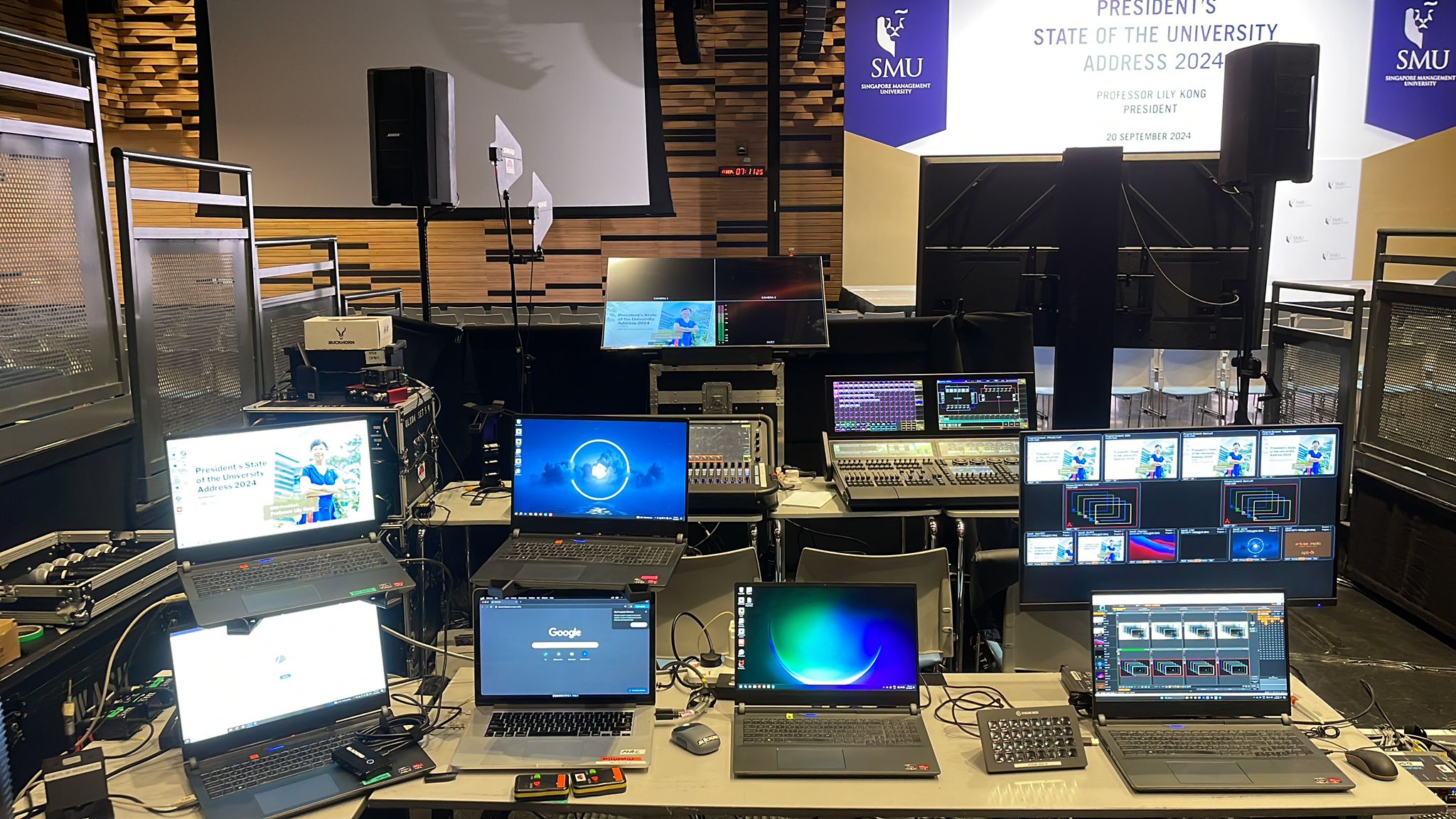
Designate an "AV control area" away from the main stage but with clear sightlines to the speakers and screens. This area houses your video switcher, streaming computer/encoder, mixing console, and technical operators. Ensure adequate space for multiple team members and equipment.
Cost Considerations
Hybrid event AV costs more than in-person-only events due to additional cameras, streaming platform subscriptions, and higher technical staff requirements. Typical cost additions for hybrid vs. in-person only:
- Additional cameras and video switching: +$2,000–$5,000
- Streaming platform and encoding equipment: +$1,000–$3,000
- Additional technical staff (streaming director, online moderator): +$2,000–$4,000
- Internet upgrade or backup connectivity: +$500–$1,500
- Total additional cost: $5,500–$13,500+ for a 300-person hybrid event
While hybrid adds cost, the extended reach (potentially 100s or 1000s more remote viewers) and ability to serve geographically dispersed audiences makes it worthwhile for many organizations.
Technical Rehearsal for Hybrid Events
Hybrid events absolutely require comprehensive technical rehearsals. Schedule a rehearsal 2–3 days before the event where:
- Test complete end-to-end streaming from venue to platform
- Verify video quality, audio levels, and stream stability
- Practice camera switching and presentation content transitions
- Test interactive features (Q&A, polls, chat moderation)
- Simulate breakout rooms or other advanced features
- Test internet failover procedures and redundancy
- Brief all speakers on both in-person and remote engagement
- Run through a sample "virtual audience question" workflow
Many technical issues only surface during rehearsal. Discovering them then rather than during your live event is invaluable.
Accessibility and Inclusive Design
Hybrid events should be accessible to all participants. Consider:
- Captions/Subtitles: Live captions benefit both deaf/hard of hearing participants and those in noisy environments. Most streaming platforms support real-time captions.
- Audio Description: For visual-dependent content, provide audio description of what's on screen for blind/low vision viewers.
- Accessible Platform Interface: Ensure your streaming platform's chat, Q&A, and controls are keyboard accessible and compatible with screen readers.
- Recording Availability: Provide recorded sessions for those unable to attend live (with captions).
Post-Event Hybrid Considerations
After your event ends, hybrid events generate additional content and data:
- Recording of full live stream (often automatically by platform)
- Chat logs and Q&A transcripts from virtual participants
- Poll and survey results from both in-person and remote voters
- Video files from individual cameras (for editing highlights reels, etc.)
- Data on remote viewer engagement and participation
Plan post-event content strategy: Will you edit a highlights reel? Post the full recording? Share chat transcripts? These decisions should be made during planning, not after the event ends.
Conclusion
Hybrid events represent the future of corporate gatherings, conferences, product launches, and large-scale events. By carefully planning your AV infrastructure, selecting appropriate cameras and streaming platforms, ensuring robust internet connectivity, and designing for remote participant engagement, you create an event experience that serves both in-person and virtual audiences effectively.
The key differentiator between mediocre and excellent hybrid events is professional AV planning and technical execution. Professional AV providers bring experience from hundreds of hybrid events and know how to design setups that make remote viewers feel genuinely included rather than like second-class attendees.
Plan your next event with AVL Services
Our team handles everything from pre-event planning through technical rehearsal to day-of execution — for corporate events, weddings, concerts, exhibitions and hybrid productions across Singapore.