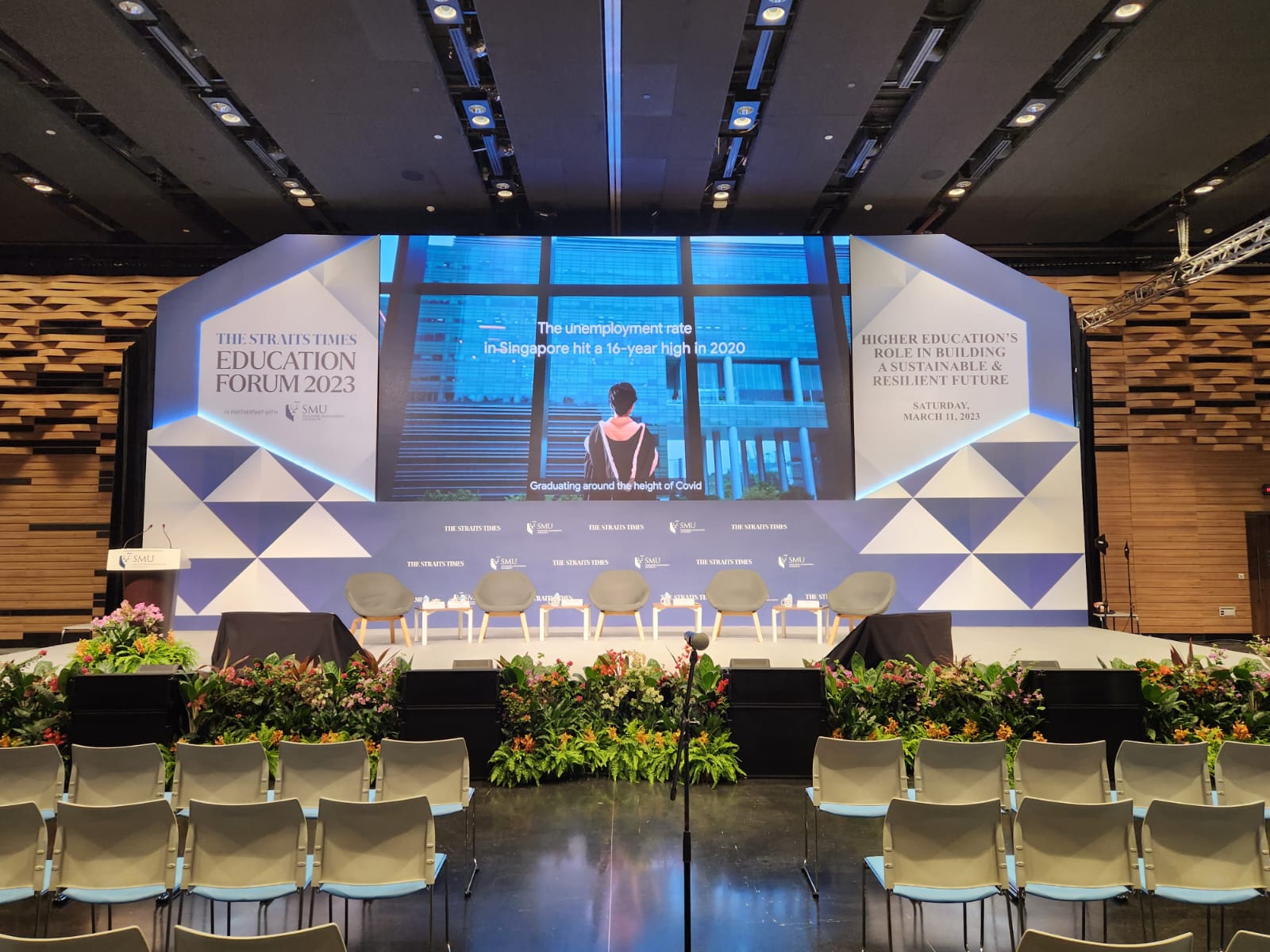
Why a Comprehensive AV Checklist Matters
Conferences are complex events where multiple speakers, sessions, and technical requirements must work seamlessly together. A single AV failure—audio feedback, projector malfunction, missed video cue, or lighting issue—can derail presentations and damage your conference's professional reputation. This comprehensive checklist helps you systematize AV planning, coordinate with vendors, and ensure nothing falls through the cracks.
Whether you're organizing a 50-person industry seminar or a 1,000-person annual conference, this framework applies to all scales. Large conferences might need to expand certain sections, while smaller events might simplify others.
8-12 Weeks Before: Planning and Vendor Selection
- Define your conference size, duration, and room layout
- Identify all content that will be presented (slides, videos, live feeds)
- List all required equipment: microphones, speakers, screens/LED walls, lighting
- Determine if you need live streaming or recording capabilities
- Get quotes from at least 3 AV service providers
- Check provider references from similar recent events
- Confirm venue technical capabilities and limitations
- Review equipment specifications and ask about backup systems
- Establish AV budget and allocate funds across different elements
- Select your primary AV provider and sign contract
- Schedule initial planning call with AV provider
- Collect detailed session and speaker information from event team
- Create speaker guidelines for presentation format and specifications
- Establish content submission deadlines (typically 2 weeks before event)
4-6 Weeks Before: Content and Setup Planning
- Confirm final number of speakers and sessions
- Request all presentations from speakers in finalized format
- Create detailed run-of-show (timing for each session and AV element)
- Map out microphone placement and requirements (stage, audience Q&A, roving)
- Define which sessions require live video feeds (if any)
- Confirm lighting requirements for stage, audience, and venues
- Establish internet bandwidth requirements and coordinate with venue IT
- Schedule tech rehearsal date (ideally 2-3 days before event)
- Brief speakers on AV workflow and best practices (file formats, timing cues)
- Create detailed event timeline showing AV cues and transitions
- Confirm any special equipment needs (green screen, motion graphics, live animation)
- Coordinate with caterers and security on AV infrastructure placement
- Plan backup internet connection (mobile hotspot as failsafe)
- Identify critical speakers and prepare extra-detailed backup plans
2-4 Weeks Before: Technical Preparation
- Review all submitted presentations for technical compatibility
- Test presentations for file corruption, playback issues, embedded media
- Create backup copies of all presentations on multiple devices
- Prepare master presentation file combining all sessions (if using single file workflow)
- Set up video playback system and test all embedded videos
- Confirm microphone requirements: wireless handheld, lavalier, headset, stage stand?
- Coordinate with venue on electrical requirements and outlet locations
- Order any specialized equipment (green screen, teleprompter, monitor stands)
- Test all interactive elements (audience polling, Q&A software, live chat)
- Create lighting cue sheet and document any special lighting moments
- Schedule pre-event call with AV team to review detailed timeline
- Prepare emergency contact list for AV provider, venue, and key staff
- Confirm all speaker presentation files received and cataloged
- Plan speaker briefing session on AV logistics and timing
1 Week Before: Final Checks and Coordination
- Confirm AV equipment delivery schedule with provider
- Verify all presentations in their final format
- Check that all microphones and wireless systems are confirmed and tested
- Confirm final technical rehearsal date and time with venue and AV team
- Prepare all backup presentations and failover procedures
- Confirm internet connectivity testing with IT team
- Test any live streaming or recording equipment with sample content
- Finalize speaker introduction videos or audio (if used)
- Confirm lighting design with AV provider and walkthrough stage/venue
- Create detailed AV cue sheet for operators during event
- Brief venue staff on AV placement and access to control areas
- Confirm backup equipment availability (spare projector, extra microphones, cables)
- Prepare speaker note cards with AV cues and timing information
- Review weather contingency plans (if event has outdoor components)
- Confirm all AV team members' attendance and roles
Technical Rehearsal (2-3 Days Before): Complete Run-Through
- Complete equipment setup exactly as it will be for real event
- Test all audio inputs: microphones, video playback, ambient sound
- Test all video outputs: projectors, LED walls, backup displays
- Run through all presentations in order with timing
- Test every microphone with actual speakers if possible, or substitute
- Confirm wireless microphone frequency coordination (no interference)
- Test video playback with all embedded media and transitions
- Verify lighting cues work as planned and coordinate with speakers
- Test live streaming (if applicable) with sample content to destination
- Confirm recording equipment captures audio and video correctly
- Test audience interaction elements (polling software, Q&A interface)
- Walk through presenter area and confirm sight lines to speakers
- Confirm monitor displays show correct content to speakers and crew
- Test presentation clicker / remote controls
- Complete full run-through at normal event pacing with all cues
- Document any issues and confirm fixes for event day
- Brief speakers on actual AV workflow and backup procedures
Day Before and Day Of: Final Readiness
- Arrive early (2-3 hours before doors open)
- Complete final audio check and microphone levels
- Verify all presentations loaded and accessible in control system
- Test all microphones one more time in actual venue conditions
- Confirm lighting is set and operational
- Test screen/projection display and confirm image quality
- Verify internet connection and live streaming system (if applicable)
- Confirm recording equipment is running and capturing content
- Position AV operators and confirm their headsets and communication system
- Place backup presentations and equipment accessible to operators
- Review emergency contacts and procedures with entire team
- Conduct brief walkthrough with all speakers confirming their requirements
- Position speaker notes with AV cues at presenter lectern or monitor
- Verify presentation clickers are working with correct batteries
- Test any interactive polls or Q&A systems with sample audience interaction
- Confirm breakout rooms or multiple spaces have proper audio/visual setup
- Do final run-through of opening segment with all elements
Audio System Detailed Checklist
Microphone Setup
- Stage microphone(s) for speakers at lectern
- Handheld wireless microphone for roving audience Q&A if applicable
- Lavalier/headset microphones for keynote speakers or featured presenters
- Ambient microphone to capture room sound for recording
- Test all microphones with actual speakers (or substitutes) before event
- Confirm wireless frequency coordination—no interference between channels
- Establish microphone cutoff policy (who manages when mics are live)
- Have backup batteries for all wireless microphones
Speaker System
- Main PA system sized for venue and audience
- Main left/right speakers or full line array for large venues
- Center fill speakers to cover middle seating areas
- Confidence monitors for speakers to hear themselves and audio cues
- Subwoofers if audio includes music or low-frequency content
- Mixing console with clear input/output routing
- Adequate speaker cables and backup cables
- Confirm audio levels during sound check—not too loud, not too quiet
Audio Mixing During Event
- Assign trained audio technician to mix throughout event
- Create detailed mixing notes for each speaker/session
- Monitor audio quality and troubleshoot any issues in real-time
- Manage transitions between speakers and audio sources smoothly
- Control feedback and adjust levels if microphones change position
- Ensure recorded audio is clean and at proper levels
Visual System Detailed Checklist
Display Equipment
- Primary display: projector and screen OR LED video wall
- Secondary displays (if multiple breakout sessions)
- Speaker monitor: small display visible only to speakers
- All displays tested and focused/aligned before event
- Image quality verified at final rehearsal
- Backup projector or LED wall available in case of primary failure
Presentation Control
- Video playback system prepared with all presentations
- Backup copy of all presentations on secondary system
- Presentation remote/clicker tested and with backup batteries
- Operator ready to advance slides with wireless control
- Master timeline showing exactly when presentations change
- Backup procedure if primary presentation system fails
Video Playback
- All video files tested on conference playback system
- Video format compatibility verified (MP4, MOV, AVI, etc.)
- Embedded videos within presentations tested separately
- Video playback levels set (not too bright, colors correct)
- Audio for video files confirmed and at proper mix level
- Timing and cues for video transitions documented
- Backup video copies on secondary device
Lighting Detailed Checklist
- Stage lighting properly positions speakers and equipment
- Ambient room lighting supports presentations (not washing out screens)
- Accent/uplighting enhances venue ambiance
- Lighting levels tested during technical rehearsal
- Lighting cues documented for each speaker or session transition
- Operator ready to adjust lighting as needed or on cue from run-of-show
- Backup lighting elements available if primary fails
- Color temperature consistent across all light sources
Recording and Streaming (If Applicable)
- Audio feed from mixing console routed to recording/streaming system
- Video feed from presentation system routed to recording/streaming
- Camera(s) positioned to capture speakers and audience (if desired)
- Streaming platform tested with test broadcast to confirm delivery
- Recording storage device checked for adequate space
- Backup recording device running simultaneously as failsafe
- Streaming back-up internet connection confirmed
- Captions/subtitles system ready (if including accessibility features)
- Post-event file management plan (editing, uploading, archiving)
Backup Plans and Contingencies
Audio Failures
- If microphone fails: have backup wireless mic ready to swap immediately
- If speaker system fails: have portable amplified speakers as emergency backup
- If mixing console fails: have simplified mixer ready that can bypass it
- Contact number for AV provider's emergency support team
Video Failures
- If projector fails: switch to backup projector or LED wall alternative
- If presentation file corrupts: have backup copy from secondary system
- If speaker's laptop won't connect: use IT team to troubleshoot or switch to USB backup copy
- If streaming fails: continue recording locally; resume streaming when restored
General Contingencies
- Power failure: coordinate with venue on backup power systems
- Internet outage: have mobile hotspot as backup for streaming
- Speaker no-show: have backup presenter ready or adjust program
- Equipment delay: arrange emergency rental backup equipment
Post-Event Tasks
- Secure all recorded content and multiple backup copies
- Download any live streaming recordings from platform servers
- Confirm all equipment breakdown and removal from venue
- Collect feedback from speakers on AV experience
- Debrief with AV team on what worked and what to improve
- Review any issues and document lessons learned
- Plan post-event content editing and distribution timeline
- Archive all presentations and recordings for future reference
- Follow up with AV vendor on final invoice and service assessment
Key Contact Information Template
Keep this information handy on event day:
- Venue Contact: [Name, Phone, Email]
- AV Provider Lead: [Name, Phone, Email]
- AV On-Site Supervisor: [Name, Phone, Email]
- IT/Internet Support: [Name, Phone, Email]
- Emergency AV Support: [24-hour helpline]
- Conference Organizer Lead: [Name, Phone, Email]
- Stage Manager: [Name, Phone, Email]
- Backup AV Equipment Location: [Address, Contact]
Conclusion
A comprehensive AV checklist transforms conference organization from stressful and unpredictable to systematic and professional. By planning 8–12 weeks in advance, coordinating closely with your AV provider, conducting thorough technical rehearsals, and maintaining detailed contingency plans, you create the conditions for flawless presentations and a professional conference experience.
Remember that your AV team are partners in your success. Professional AV providers like AVL Services thrive on detailed planning, clear communication, and comprehensive rehearsals. When everyone follows a systematic checklist, the result is conferences that run smoothly and leave attendees impressed with the production quality and professionalism.
Plan your next event with AVL Services
Our team handles everything from pre-event planning through technical rehearsal to day-of execution — for corporate events, weddings, concerts, exhibitions and hybrid productions across Singapore.